
The Ultimate Logitech Headphone Model & Troubleshooting Guide
Logitech G headsets are staple equipment in the esports world and casual gaming setups alike, famous for their high performance LIGHTSPEED wireless tech, DTS Surround Sound, and comfortable long session designs. From competitive FPS players relying on the tournament ready G Pro X series to streamers rocking the lightweight G733 or Aurora G735, Logitech headsets endure thousands of hours of intense gameplay. However, relentless daily use takes a heavy toll on physical components. Over time, predictable issues emerge, most notably peeling synthetic leatherette, worn sports mesh, mic boom connection dropouts, headband tension fatigue, and power switch contacts wearing down. This definitive guide highlights the known external weak points and diagnostic characteristics across Logitech’s leading gaming ranges, showing you exactly how to restore that out of the box comfort and pristine audio profile using our premium DIY parts.
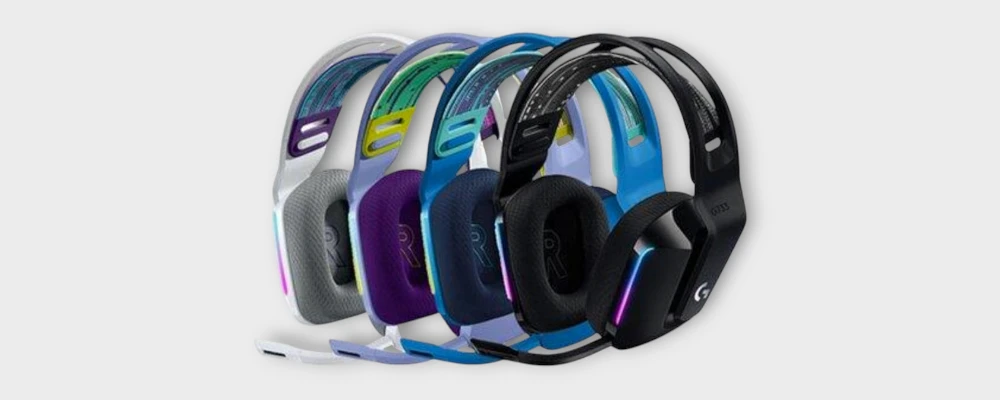
Anatomy of a Headset: What Are Your Logitechs Made Up Of?
To keep your Logitech headset in top condition, it helps to understand the key structural and acoustic components that keep it functioning. While internal sound cards and LIGHTSPEED wireless receivers require specialist care, your primary comfort and acoustic elements are easily maintained and refreshed:
Ear Pads / Cushions: The large oval rings wrapped in breathable sports mesh, velour, or synthetic leatherette resting around your ears. They dictate your marathon gaming comfort, seal in bass frequencies, and provide the passive isolation needed to hear subtle footstep cues. (We stock premium replacement ear pad sets for all major Logitech G series families).
Headband Arch & Suspension Strap: The metal or plastic top beam bridging the earcups. On models like the G Pro X, it features leatherette padding; on models like the G733, it uses a reversible fabric suspension strap that can stretch or become unhygienic over time.
Hinge Swivel Blocks & Yokes: The structural pivot arms holding the earcups in place, allowing vertical tilt or swivel rotation.
Detachable Boom Microphone: The flexible mic arm plugging into the left earcup via a 3.5mm jack, housing noise cancelling capsules for team chat.
Power Toggle Switches & Volume Wheels: The physical controls located on the back of the earcups. Power slider switches on older models are notorious for developing loose internal contacts over time.
Audio & Charging Cables: The external cords feeding wired audio via 3.5mm/USB or charging the internal battery via Micro USB or USB C.
The Logitech Headphone Family Comparison Matrix
Logitech’s gaming catalogue spans lightweight wireless headsets, flagship RGB surround sound models, and professional esports gear. Use our structured comparison matrix below to quickly identify your model series, technical profile, and direct link to its premium replacement cushions.
| Model / Series | Classification | Key Characteristic | Connection Type | Premium Replacement Cushions |
|---|---|---|---|---|
| Logitech G PRO X 2 LIGHTSPEED | Flagship Esports Over-Ear | 50mm Graphene Drivers, Rotating Hinges & 50hr Battery | LIGHTSPEED Wireless / Bluetooth / 3.5mm | Shop G Pro X Cushions → |
| Logitech G PRO X / G PRO (Wired & Wireless) | Pro Esports Over-Ear | Steel & Aluminium Frame, Blue VO!CE Mic & 50mm Pro-G Drivers | LIGHTSPEED Wireless / 3.5mm / USB DAC | Shop G Pro X Cushions → |
| Logitech G733 LIGHTSPEED | Lightweight Wireless Gaming | Reversible Suspension Strap, LIGHTSYNC RGB & Dual Layer Foam | LIGHTSPEED USB Receiver / USB-C | Shop G733 Cushions → |
| Logitech G735 (Aurora Collection) | Inclusive Ergonomic Wireless | White Mist Finish, Small Head Fit & Bluetooth Dual Audio Mixing | LIGHTSPEED / Bluetooth / 3.5mm | Shop G735 Cushions → |
| Logitech G935 / G635 Artemis Spectrum | Flagship Surround Sound | 50mm Pro-G Drivers, DTS Headphone:X 2.0 & Programmable G-Keys | LIGHTSPEED Wireless / USB / 3.5mm | Shop G935 Cushions → |
| Logitech G933 / G633 / G533 / G930 / G430 / G330 / G233 / G433 | Legacy Wireless & Wired Gaming | Pro-G Audio Drivers, Sports Mesh Padding & Flip to Mute Mics | 2.4GHz Wireless / USB / 3.5mm | Shop G533 / Legacy Cushions → |
| Logitech G435 LIGHTSPEED | Ultra-Light Budget Wireless | 165g Feathweight Build, Dual Beamforming Mics & Eco-Fabric | LIGHTSPEED / Bluetooth | Reference Model |
| Logitech G535 LIGHTSPEED | Mid-Range Performance Wireless | Reversible Headband Strap, 33hr Battery Life & Lightweight Fit | LIGHTSPEED Wireless USB Dongle | Reference Model |
| Logitech Astro A50 X / A50 Gen 5 | Console & PC Flagship | PLAYSYNC Multi-System Base Station & Pro-G Graphene Drivers | LIGHTSPEED / Bluetooth / Base Station | Reference Model |
| Logitech Astro A10 / A20 / A30 Series | Multi-Platform Gaming | Rugged Steel Headband Frames, Custom Tags & Mobile App EQ | LIGHTSPEED / Bluetooth / 3.5mm | Reference Model |
Individual model breakdown continued below
How Can We Help You Today?
Shop Logitech Replacement Ear Pads
Fix your Logitech gaming headset at home with our easy to install Logitech ear cushions. Place your order before 12pm for guaranteed same day dispatch!

Mail In Logitech Ear Pad Replacement Service
Prefer a professional fitting? Let our specialised workshop engineers replace your ear pads for you within a fast 1 to 3 working day turnaround.

Quick Diagnostics: Is It an Easy DIY Part Swap?
When your Logitech headset shows signs of wear or audio issues during gaming, use our diagnostic symptom checker below to find the fix quickly.
Compressed Foam, Peeling Leatherette, or Unhygienic Mesh
The Diagnostic: If the synthetic leatherette on your G Pro X is peeling off in tiny black specks, or if the sports mesh fabric on your G733 or G935 is discoloured, smelly, and flat, your cushions need replacing. Long gaming sessions cause ear pads to absorb sweat and oils. This breaks down the internal memory foam core, causing your ears to rub painfully against the hard plastic driver covers while letting external room noise leak in.
The Severity: Low (Easy DIY Fix!). Logitech ear pads are designed for swift user replacement. Depending on the model, they either feature a flexible rubberised lip that stretches around the perimeter groove of the earcup or snap in directly. Anyone can perform a swap at home in under 5 minutes.
The Solution: Restore maximum gaming comfort and crisp sound isolation instantly. Simply stretch off your old pads and slip a fresh replacement set over the earcup rim. Place your order before 12pm for guaranteed same day dispatch! Daily UK dispatch!
Crackling Audio or One Ear Cutout When Toggling Power
The Diagnostic: On older models like the G933 or G935, pushing the physical power switch up can cause audio in one ear to cut out or crackle until you wiggle the switch into a sweet spot.
The Severity: Low to Medium. This is caused by internal copper contacts on the sliding switch accumulating dust or oxidation over years of use.
The First Line of Defence: Turn the headset off. Apply a small drop of contact cleaner or isopropyl alcohol into the power switch seam, then slide the switch back and forth vigorously 20 times to clear surface oxidation.
Disconnected LIGHTSPEED Wireless Signal or G HUB Glitches
The Diagnostic: If the status light flashes green rapidly and fails to connect to your PC USB dongle, or if Logitech G HUB displays the headset as inactive or stuck downloading firmware, the wireless pairing or driver profile has glitched.
The Severity: Low (Software / Hardware Pin Reset).
The Fix: Insert a paperclip into the tiny pinhole hardware reset button located under the left earcup plate (on G933/G935) or on the USB dongle itself. Hold for 2 seconds to force a clean re pairing process with your PC.
How Easy Is It To Replace Logitech Ear Pads?
Common Beats Faults by Model
Logitech G Pro X & G Pro Series (Wired & Wireless)
Logitech's flagship esports headset, built with steel headband forks, removable Blue VO!CE microphones, and Pro G 50mm precision drivers.
Leatherette Peeling & Ear Cup Sweat Retention: Because the stock G Pro X leatherette pads create a tight acoustic seal for competitive sound isolation, they trap heat and sweat. High mechanical friction eventually cracks the outer coating, causing it to flake off over your ears.
3.5mm Mic Boom Contact Loose Fit: If teammates report your mic cutting out or sounding robotic, check the detachable boom arm jack. Inserting the 3.5mm mic plug without pushing until it clicks firmly into the earcup socket leads to intermittent voice dropouts.
Restore Esports Comfort: Keep your setup clean and comfortable for long Ranked sessions. Upgrade with our Logitech G Pro X / G Pro Replacement Ear Pads, or let us fit them via our G Pro X / G Pro Replacement Service.
Logitech G733 LIGHTSPEED Wireless
Ultra lightweight 278g wireless gaming headset featuring vibrant RGB lighting, dual layer memory foam, and customisable reversible suspension headbands.
Sports Mesh Staining & Cushion Compression: The breathable mesh pads on the G733 prevent sweaty ears but absorb skin oils quickly, turning grey or discoloured after months of daily play. Furthermore, as the inner foam flattens down, your ears start touching the inner driver grille.
Suspension Strap Slackness: The fabric headband strap can stretch out over time, causing the plastic frame to rest directly against the top of your skull. Grab a Logitech G733 headband strap here!
Refresh Your G733 Setup: Restore plush dual layer cushioning and fresh hygiene within minutes. Grab a pair of Logitech G733 Replacement Ear Pads or book our Logitech G733 Ear Pad Replacement Service.
Logitech G735 (Aurora Collection)
Designed specifically for smaller head sizes, featuring a White Mist aesthetic, plush cloud like padding, and dual LIGHTSPEED and Bluetooth mixing.
Discoloured White Cushions: The soft, cloud like white leatherette cushions look amazing out of the box but pick up hair dye, cosmetics, and skin oils easily, making them look worn out quickly.
Bluetooth & Dongle Audio Mix Latency: When streaming audio from a phone over Bluetooth while gaming via LIGHTSPEED, dual audio buffering can cause occasional audio lag. Resetting the Bluetooth connection in G HUB restores instant sync.
Keep Your Aurora Pristine: Swap out stained pads for fresh, plush cushions with our Logitech G735 Replacement Ear Pads or select our Logitech G735 Ear Pad Replacement Service.
Logitech G935 & G635 Artemis Spectrum
Logitech’s heavy hitting surround sound models, featuring 50mm Pro-G drivers, programmable G keys, and flip to mute boom mics.
Power Slider Oxide Cutout: The sliding power switch on the back of the left earcup is the single most common failure point on the G935. As dust gets inside, switching the headset on turns on the lights but cuts out audio in one channel.
Padded Mesh Seam Tears: The large, angular ear cushions absorb heavy clamping pressure. The internal seam holding the fabric to the plastic mounting lip can tear open under stretch.
Rebuild Your Surround Headset: Keep your drivers sounding full and punchy. Install our Logitech G935 / G635 Replacement Ear Pads or book our specialized Logitech G935 / G635 Ear Pad Replacement Service.
JBL Tune 500 Budget On-Ear Series (500BT / 510BT / 520BT)
Legacy surround sound powerhouses that pioneered Logitech’s wireless gaming lineup, featuring sports mesh padding and micro USB charging ports.
Flip to Mute Ribbon Cable Wear: Flipping the mic boom up and down repeatedly over years can cause the internal flex ribbon cable inside the hinge to wear out, resulting in a mic that stays muted even when pulled down.
Flattened Mesh Ear Pads: The original sports mesh pads compress completely flat over time, reducing passive noise isolation and making lower frequencies sound thin.
Refresh Your Legacy Gear: Keep your favourite classic headset in the game. Pick up a set of our Logitech G933 / G633 / G533 Ear Pads. You can also opt for professional workshop fitting via our Logitech G933 / G633 Replacement Service.
Why Choose Fix Headphones?
Standalone Parts: Enjoy absolute purchasing confidence with our standard 30-day returns policy on all individual, DIY headphone component sales (must be in the same condition as you received them). Plus, place your order before 12pm for guaranteed same day dispatch straight to your door. Daily UK dispatch!
Refurbished Headset Sales: Every single pair of our premium refurbished headphones undergoes a rigorous testing coming fully backed by a 12-month warranty.
Expert Mail-In Repair Services: Skip the frustratingly long factory wait times. Our dedicated workshop operates a lightning-fast 1–3 day turnaround for cosmetic repairs and 1-5 day turnaround on function repairs to restore your broken gear and get you back to your music safely.