
The Ultimate JBL Headphone Model & Troubleshooting Guide
JBL headphones are globally celebrated for their punchy "Pure Bass" acoustics, rugged outdoor battery life, and highly competitive pricing. From the casual daily commuter using the Tune series to hardcore gamers relying on the Quantum lineup, JBL headsets take a massive amount of physical abuse. Because they are the default choice for heavy gym sessions, school commutes, and late night gaming, their external components bear the brunt of relentless wear. Over time, predictable faults develop, most notably flattening or flaking leather ear cushions, plastic slider snaps, and battery charging issues. This definitive guide highlights the known external weak points and diagnostic characteristics across JBL’s leading headphone ranges, showing you exactly how to restore that out of the box comfort using our premium DIY parts.
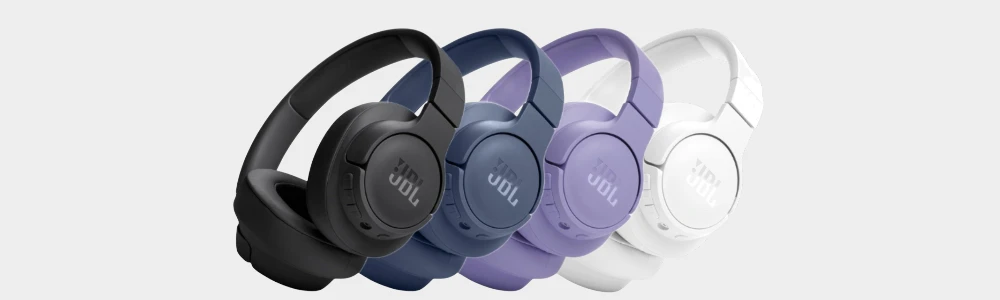
Anatomy of a Headset: What Are Your JBLs Made Up Of?
To understand how to maintain your JBLs, it helps to know the key components that keep them together. While structural plastic snaps can be tricky, your primary comfort and acoustic parts can be easily refreshed at home:
Ear Pads / Cushions: The foam rings wrapped in synthetic protein leather or fabric that rest against your head. They dictate your long-haul comfort and trap the low-end frequencies needed for JBL's signature bass profile. (We stock premium, high density replacement ear pad sets for all major JBL families).
Headband Arch & Cushion: The plastic or fabric strap spanning across your head. On budget models, this is raw plastic; on premium models, it features a padded fabric lining that can become unhygienic over time.
Hinge Swivel Joints: The plastic pivot blocks that allow the ear cups to rotate flat or fold upward into the headband. These joints take intense torque whenever the headphones are pulled open.
Sizing Sliders: The internal plastic or thin metal tracks that slide out to adjust the height of the headset.
Power & Charging Board: The internal circuitry housing the USB-C or Micro-USB port and the physical power toggle sliders common on JBL models.
Audio & Charging Cables: The external links used to feed power or wired backup audio into your headset. (We supply durable, heavy-duty replacement cables and protective accessories).
The JBL Headphone Family Comparison Matrix
JBL has a vast catalogue of audio gear spanning multiple product lines. Use our structured comparison matrix below to quickly identify your model series, technical profile, and direct link to its premium replacement cushions.
| Model / Series | Classification | Key Characteristic | Connection Type | Premium Replacement Cushions |
|---|---|---|---|---|
| JBL Tour One / One M2 | Premium Flagship ANC | True Adaptive Noise Cancelling & Spatial Sound | USB-C / 3.5mm | Shop Tour One Cushions → |
| JBL Tune 700 Series (700BT / 710BT / 720BT / 750NC / 760NC / 770NC) | Mainstream Over-Ear | Lightweight Folding Frame & Pure Bass Sound | USB-C / 3.5mm | Shop Tune 700 Cushions → |
| JBL Live 600 Series (650BTNC / 660NC / 670NC) | Premium Mid-Tier Over-Ear | Fabric Headband Accent & Smart Ambient ANC | USB-C / 2.5mm | Shop Live 600 Cushions → |
| JBL Live 400 Series (400BT / 460NC) | Premium Mid-Tier On-Ear | Compact On-Ear Profiling & Voice Assistant Sync | USB-C / 2.5mm | Shop Live 400 Cushions → |
| JBL Quantum 400 / 600 / 800 | Pro Gaming Over-Ear | QuantumSURROUND Spatial Tracking & RGB Panels | USB / 2.4GHz / 3.5mm | Shop Quantum Pro Cushions → |
| JBL Quantum 100 / 200 / 300 | Console Gaming Over-Ear | Lightweight Memory Foam & Boom Microphone | Wired 3.5mm | Shop Quantum Gaming Cushions → |
| JBL Tune 500 Series (500BT / 510BT / 520BT) | Budget On-Ear | Ultra-Compact Flat Folding Travel Design | USB-C / Wireless | Shop Tune 500 Cushions → |
| JBL E65BTNC | Legacy Lifestyle Over-Ear | Classic Hybrid Active Noise Cancellation Profile | Micro-USB / 3.5mm | Shop E65BTNC Cushions → |
Individual model breakdown continued below
How Can We Help You Today?
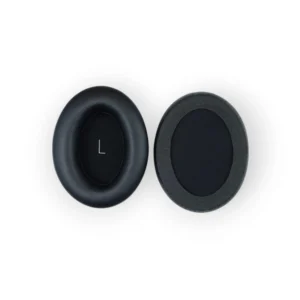
Shop JBL Replacement Ear Pads
Fix your JBL headphones at home with our easy to install JBL ear cushions. Ear pad orders placed before 12pm receive same day dispatch!
Mail In JBL Ear Pad Replacement Service
Let our specialised engineers replace your ear pads for you within 1-3 working days.
Quick Diagnostics: Is It an Easy DIY Part Swap?
When your JBLs start showing signs of age, use our diagnostic symptom checker below to find out exactly what is wrong and how to fix it easily at home.
Flat, Splitting, or Flaking Leather Cushions
The Diagnostic: If your ear pads have compressed so flat that your ears are rubbing against the hard internal speaker plastic, or if the synthetic leather is cracking and flaking away, your cushions have degraded. Because JBL headphones are incredibly popular for working out and running, they absorb constant sweat, hair products, and skin oils. This moisture dries out the synthetic leather seams, causing them to split open and expose the foam inside. This completely ruins passive noise isolation and deflates your bass response.
The Severity: Low (Easy DIY Fix!). JBL ear pads are highly user-swappable. Depending on the model, they either stretch over a plastic lip on the ear cup or snap out entirely via a built-in plastic backing flange. Anyone can swap them at home in under 10 minutes.
The Solution: Bring back that plush comfort and heavy bass response instantly. Simply remove your old cushions and mount a fresh, high-density replacement set. Order before 12pm for guaranteed same-day dispatch! Daily UK dispatch!
- Shop replacement JBL ear pads here!
Loose, Drooping Hinges or Cracked Plastic Sliders
The Diagnostic: If your headphones keep slipping down your head or an ear cup is hanging crookedly due to a visible fracture in the plastic right above the swivel joint, you have a cracked sizing slider or fatigued housing panel. To hit their lightweight design and affordable price targets, JBL utilises high tensile plastic frames on their Tune and Live lines which can fracture if dropped onto hard flooring or flexed too wide over a gym cap.
The Severity: Medium. While some internal brackets can be reinforced at home, severe structural plastic snaps usually require specialised framework replacement.
The Solution: Protect your headset from structural stress early by keeping them insulated inside an impact-resistant hard travel case whenever they are tossed into school bags or gym lockers.
Headphones Won't Power On or Hold a Charge
The Diagnostic: If you plug your charging cable in and get absolutely no LED light indicator, or if your headset dies within minutes of unplugging despite a full night on charge, you are dealing with a degraded lithium battery or a broken USB charging port.
The Severity: High. Swapping internal desoldered batteries or fixing cracked internal USB tracks requires delicate electronic servicing.
The First Line of Defence (Try a Hardware Reset): Before giving up on them, rule out a software freeze. Power on the headphones, then press and hold both the Volume Up (+) and Volume Down (-) buttons simultaneously for more than 5 seconds. The LED light should flash to signal a factory reset. If the headset remains unresponsive, the fault is physical hardware or battery depletion.
Common Beats Faults by Model
JBL Tour Series (Tour One / Tour One M2)
JBL’s premium answer to the high-end noise-cancelling market, stacked with smart adaptive software features and dense padding geometries.
Acoustic Seal Degradation: Because the Tour series relies heavily on software algorithms to map external noise levels, compressed or flat ear cushions cause immediate system issues. If sound leaks through a broken cushion border, the internal microphones struggle, resulting in an annoying background hiss or weaker noise cancellation.
Restore Flagship Quietness: Keep your adaptive ANC performing flawlessly by snapping out flat cushions and locking in our premium, sound-isolating memory foam ear pads.
JBL Tune Over-Ear Series (700BT / 710BT / 720BT / 760NC / 770NC)
An incredibly popular mainstream over-ear range spanning across the UK. Celebrated for massive playtimes, but their lightweight frames require periodic maintenance.
The Seam Pull Splitting: To achieve an feather-light weight on your ears, the stock factory cushions utilise a very thin, bonded synthetic seam. Under continuous expansion when pulling the headphones open, these outer stitch lines tear open, exposing yellow foam.
Ear Fatigue: Once the factory foam flattens down entirely, your ears press directly against the rigid inner speaker grill, creating sharp cartilage fatigue within an hour of listening.
JBL Live Over-Ear & On-Ear Series (660NC / 460NC)
JBL's stylish mid-tier line implementing fabric textured headbands alongside integrated ambient awareness.
Sweat Saturation & Foul Odours: Because the Live series is highly favored as an entry-level fitness and weightlifting companion, the pads regularly act like a sponge for sweat. Over a few months of intense workout blocks, the internal padding holds onto stale moisture, leading to unpleasant odours and material sliding.
Hygiene & Comfort Upgrade: Don't wear unhygienic cushions to the gym. Swap your worn pads with our high-density, fresh sweat-resistant replacements.
JBL Quantum Gaming Series (100 / 200 / 300 / 400 / 600 / 800)
Heavyweight, feature-packed gaming headsets engineered for immersive multi-channel soundstages during long PC and console sessions.
Long-Haul Compression Flaws: Gamers wear their headsets for hours on end. Under continuous, uninterrupted clamping force, the stock padding takes a heavy permanent set, losing its structural spring. This causes the headset to squeeze your skull unevenly, provoking temple pain.
Rebuild Your Gaming Setup: Bring back absolute marathon-session comfort and block out external household noise completely with our premium thick memory foam replacement sets.
JBL Tune 500 Budget On-Ear Series (500BT / 510BT / 520BT)
The absolute king of ultra-compact, flat-folding commuter headphones. Highly durable internally, but the high friction of sitting directly on the ear takes a massive toll on the padding surface.
The Flaking Leatherette Mess: Being an on-ear design, these pads twist and rub directly against your ear cartilage every time you move. This high mechanical friction causes the outer skin of the pad to crack, peel, and shed little black flakes all over your neck and hair.
Clean Up Your Commute: Banish flaking leatherette debris instantly with our premium replacement on-ear pad sets, engineered to fit the 500, 510BT, and 520BT perfectly.
Why Choose Fix Headphones?
Standalone Parts: Enjoy absolute purchasing confidence with our standard 30-day returns policy on all individual, DIY headphone component sales (must be in the same condition as you received them). Plus, place your order before 12pm for guaranteed same day dispatch straight to your door. Daily UK dispatch!
Refurbished Headset Sales: Every single pair of our premium refurbished headphones undergoes a rigorous testing coming fully backed by a 12-month warranty.
Expert Mail-In Repair Services: Skip the frustratingly long factory wait times. Our dedicated workshop operates a lightning-fast 1–3 day turnaround for cosmetic repairs and 1-5 day turnaround on function repairs to restore your broken gear and get you back to your music safely.