
The Ultimate Apple AirPods Max Model & Troubleshooting Guide
Apple’s AirPods Max are globally celebrated for their striking anodised aluminium aesthetic, spatial audio tracking, and industry leading active noise cancellation (ANC). However, because they are crafted from heavy, premium metals and packed with highly intricate electronic sensors, daily use exposes them to some incredibly unique wear and tear challenges. From liquid condensation pooling inside the ear cups to sagging mesh headbands and delicate internal ribbon cable failures, even a premium Apple headset can degrade over time. This definitive guide highlights the known external and internal weak points across Apple’s flagship generations, showing you exactly how to troubleshoot them and restore that out of the box feel with our premium replacement ear pads, protective covers, and cables.
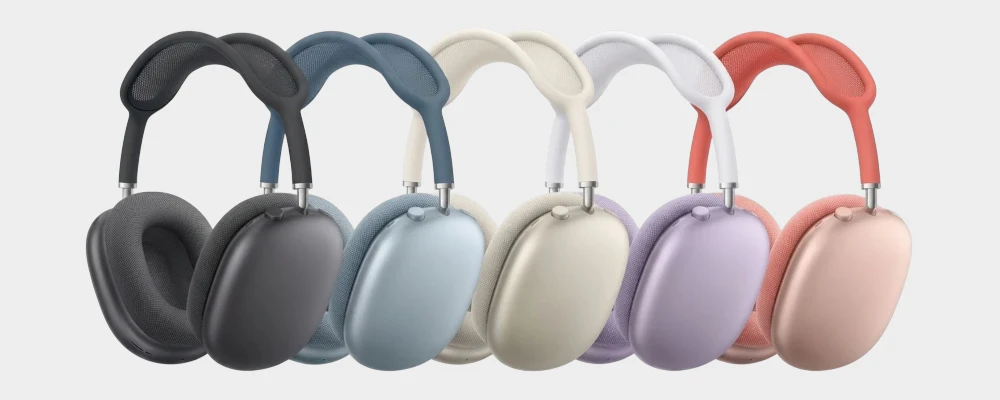
Anatomy of a Headset: What Are Your AirPods Max Made Up Of?
To understand how your AirPods Max function, it helps to know the key components that keep them together. While some structural or internal faults require manufacturer support, several key comfort and protection elements can be easily upgraded at home:
Ear Cushions: Memory foam rings wrapped in an acoustic mesh fabric that attach magnetically to the aluminium cups. They provide the essential seal needed for ANC. (We stock a premium range of replacement magnetic ear pads in a variety of clean colourways).
Mesh Canopy Headband: The breathable knit mesh canopy arched across the top stainless steel frame. It is designed to distribute weight evenly, though the mesh can stretch, sag, or tear under continuous heavy use.
Telescoping Arms & Swivel Joints: The smooth-sliding extension arms and articulating joints that connect the stainless steel headband to the aluminium cups.
Aluminium Ear Cup Shells: The physical outer metallic shells that house the internal acoustic speaker drivers, batteries, and logic boards. Highly prone to scratching. (We supply durable silicone protective covers AND stylish TPU protectors to shield these metal shells from scuffs).
Headband Connection Pins: Small, needle-like electrical contacts at the ends of the headband that slot into the ear cup jacks to link the left and right speakers.
Internal Ribbon Flex Cables: The ultra-thin, flexible copper leads that pass through the rotating hinge mechanism to transfer data and power between both ear cups.
Logic Boards & Power Management: The complex H1 or H2 silicone computing boards and lithium batteries tucked inside the aluminium housings.
Quick Diagnostics: When Can You Fix It at Home?
When your AirPods Max start acting up, use our diagnostic symptom checker below to find out exactly what is broken, how to address it, and whether you can handle it yourself or need to contact Apple Support.
Stuck in a Pairing Loop, Flashing Amber/White, or No Power
The Diagnostic: If your headphones keep flashing amber three times, refuse to pair with your iPhone, or have gone completely dead, you are likely dealing with internal condensation or power board failure. Because the ear cups are machined from cold aluminium, normal body heat creates rapid internal condensation. This moisture pools behind the drivers, seeping directly into the ribbon connectors and headband jacks to cause electrical short circuits.
The Severity: High (Professional Diagnostic Needed). Cleaning liquid-damaged pin connections or swapping out internal power boards requires specialised micro-electronic work.
The Solution: As we do not offer internal hardware repairs for Apple products, we recommend contacting Apple Support.
Headband Mesh is Sagging, Stretched, or Placing Weight on Your Skull
The Diagnostic: When brand new, the knit mesh canopy suspends the steel frame completely off your head. However, under heavy daily handling, the knit mesh stretches out, collapses, or tears. Once the canopy loses its elastic tension, the heavy steel frame rests directly on your skull, causing severe listening fatigue and headaches within minutes of wear.
The Severity: Medium (DIY Protection). While replacing the entire structural headband requires detaching the frame, you can easily prevent or cure this contact pain at home using protective accessories.
The Solution: Shield your head and distribute the weight of the metal arch. Installing one of our premium silicone headband protective covers over your sagging mesh instantly cushions the frame and restores comfort without needing to dismantle the headset.
Dirty, Odorous, or Threadbare Magnetic Ear Cushions
The Diagnostic: If your fabric cushions are frayed, flat, or holding onto workout sweat and makeup odours, your magnetic pads have reached the end of their lifespan. Degraded ear cushions cannot form a tight acoustic seal around your ears, causing your active noise cancellation (ANC) to sound weak or leak sound.
The Severity: Low (Easiest DIY Fix!). Apple designed these ear cushions to be completely tool-free and user-swappable. They are held in place purely by strong internal magnets.
The Solution: Instantly refresh your comfort and lock in your active noise cancellation. Simply pull off your old cushions and snap a fresh, premium replacement set into place. Order before 12pm for guaranteed same-day dispatch! Daily UK dispatch!
Sound Drops Out Completely When Rotating the Ear Cups (Flexgate)
The Diagnostic: If your audio plays perfectly while your headphones are sitting narrow, but instantly cuts out, pops, or disconnects the moment you swivel the ear cups to put them on your head, your internal hinge ribbon cable is fractured. Every time the ear cups rotate, the thin internal copper ribbon cable flexes inside the hinge pivot. Over years of swivelling, these microscopic copper tracks develop hairline cracks and break.
The Severity: High (Professional Repair Needed). This is a highly intricate hardware fault that requires stripping down the precision rotational hinges.
The Solution: Because this requires micro-soldering, you will need to seek assistance from Apple or a third party providor, as we do not offer hardware repair services for this issue.
Try a Hardware Reset First!
Before seeking external technical support, rule out a software connection crash. To factory reset your AirPods Max, press and hold both the Noise Control Button and the Digital Crown on the right ear cup simultaneously for 15 seconds. Keep holding until the status LED light at the bottom flashes amber, then white. If the LED remains dark or goes back to a flashing amber pairing loop, a physical internal condensation or hardware short is present.
How Can We Help You Today?
Shop Apple Replacement Ear Pads
Instantly refresh your listening comfort and restore your active noise cancellation. Our ear pads are easy to snap on and feature a 30 day returns policy. All orders placed before 12pm receive same-day dispatch! Daily UK dispatch!

Shop Accessories & Cables
Shield your aluminium shells and sagging headbands from wear and tear. Explore our range of durable silicone shell guards, protective headband wraps, travel cases, and heavy-duty audio connection cables.
How to Identify Your AirPods Max
Because Apple’s aesthetic has remained consistent, identifying your exact generation is key to buying the correct charger cables or matching colourways:
Check the Charging Port: The original Gen 1 (2020) model features Apple's proprietary Lightning port. Both the 2024 USB-C Refresh and the Gen 2 (2026) models utilise a completely symmetrical, modern USB-C port.
Locate the Serial Number: Pull off the magnetic left ear cushion. Look inside the speaker cavity; Apple prints the unique 12-digit serial number in fine text directly on the inner plastic wall.
Verify by Features (Gen 2 exclusive): If your headphones have a USB-C port and can run advanced software features like Adaptive Audio and Live Translation, you are holding the H2-powered AirPods Max Gen 2 (2026).
Apple AirPods Max Generation Comparison Matrix
We've created the table below to provide a quick overview of the technical and physical classifications of Apple's flagship headphone line.
| Model / Series | Classification | Primary Chipset | Port Connection | Premium Replacement Cushions |
|---|---|---|---|---|
| AirPods Max Gen 2 (2026) | Premium Flagship | Apple H2 Chip | USB-C | AirPods Max Magnetic Cushions → |
| AirPods Max USB-C Refresh (2024) | Premium Flagship | Apple H1 Chip | USB-C | AirPods Max Magnetic Cushions → |
| AirPods Max Gen 1 (2020) | Legacy Flagship | Apple H1 Chip | Lightning | AirPods Max Magnetic Cushions → |
Individual model breakdown continued below
Common Beats Faults by Model
AirPods Max Gen 2 (2026)
Announced in March 2026, the long-awaited Gen 2 upgrade implements the lightning-fast Apple H2 processor to deliver massively improved ANC, Adaptive Audio, and Live Translation capabilities.
The Squeal & Static Effect: While the H2 chip boosts active noise cancellation, heavy sweat or condensation building up inside the microphone cavities can trigger loud, high-pitched feedback squeals or static noises in transparency mode.
Protect Your Next-Gen Investment: Maintain your spatial audio fidelity and hygiene by changing flat, moisture-clogged cushions early, and guard the metal housing with our sleek outer silicone covers. Standalone part orders placed before 12pm receive guaranteed same-day dispatch! Daily UK dispatch!
Are your ear pads worn, dirty or smelly?
Want to protect your headphones from further damage?
AirPods Max USB-C Refresh (2024)
Launched to bring modern charging standardisation to the Apple ecosystem, this minor refresh swapped the legacy Lightning port for USB-C and introduced updated pastel colour profiles, while retaining the original H1 audio architecture.
Slipping Headband Arms: Heavy daily adjustment can wear down the internal friction tracks of the steel slider arms, causing the ear cups to slip out of adjustment.
Outer Shell Scuffs: The sleek matte finish on the aluminium ear cups can easily scratch when placed on desks or packed into bags.
Keep Your Refresh Pristine: Prevent metal-on-metal scrapes. Slip a pair of our lightweight silicone covers over the ear cups to preserve their resale value.
Are your ear pads worn, dirty or smelly?
Are your ear pads worn, dirty or smelly?
AirPods Max Gen 1 (Lightning - 2020)
The pioneer over-ear model that set the standard for premium aluminium consumer headphones.
Severe Condensation Build-up: Having been on the road the longest, legacy Gen 1 models are highly vulnerable to cumulative green copper corrosion on the internal headband connection pins due to years of sweat exposure.
Overhaul Your Classic Legend: Banish flaking materials and worn aesthetics. Refresh your comfort at home with our premium replacement ear pads and rugged travel cases. All part orders are backed by our standard 30-day returns policy.
Want to protect your headphones from further damage?
Want to protect your headphones from further damage?